Agent Development Frameworks
Agent Development Frameworks
Agent Development Frameworks
The transition from a research prototype to a production-grade agent system is one of the most demanding engineering challenges in modern AI development. While academic papers demonstrate impressive capabilities in controlled settings, real-world deployment exposes a host of concerns that go far beyond raw task performance: reliability under adversarial inputs, observability of internal reasoning, testability of complex multi-step workflows, and the operational overhead of serving millions of requests at scale. This section surveys the landscape of agent development frameworks-- the tools, libraries, and platforms that have emerged to address these challenges--and provides practical guidance for building, testing, deploying, and iterating on production agent systems.
25.1 Motivation: The Engineering Gap
Why Agent Engineering Is Hard
Building a capable agent in a Jupyter notebook is straightforward. Building one that runs reliably in production--handling edge cases, recovering from failures, scaling to load, and improving over time--requires a fundamentally different engineering discipline.
Research prototypes typically assume a cooperative environment: well-formed inputs, available tools, responsive APIs, and a patient human observer ready to restart the process when something goes wrong. Production agents face none of these luxuries. The engineering gap between prototype and production manifests across several dimensions:
Reliability. A production agent must handle tool failures gracefully, recover from partial state corruption, and avoid infinite loops or runaway API calls. Error handling must be systematic, not ad hoc.
Observability. When an agent produces a wrong answer or takes an unexpected action, operators need to understand why. This requires structured logging of every LLM call, tool invocation, and state transition--not just the final output.
Testability. Agent behavior is non-deterministic and context-dependent, making traditional unit testing insufficient. Comprehensive agent testing requires specialized evaluation harnesses, golden trajectory comparisons, and behavioral test suites.
Deployment. Agents are stateful, long-running processes that may span minutes or hours. Serving infrastructure must support async execution, checkpointing, resumption after failures, and multitenant isolation.
Agent development follows a maturity progression:
1. Prototype: Single-file script, hardcoded prompts, manual testing
2. Alpha: Modular code, basic error handling, manual evaluation
3. Beta: Framework-based, automated tests, staging environment
4. Production: Full observability, CI/CD, auto-scaling, SLAs
5. Mature: Continuous learning, A/B testing, self-improvement loops
Most teams underestimate the gap between stages 2 and 3.
25.2 The Agent Development Lifecycle
A structured development lifecycle helps teams move systematically from concept to production. Figure 25.1 illustrates the five major phases.
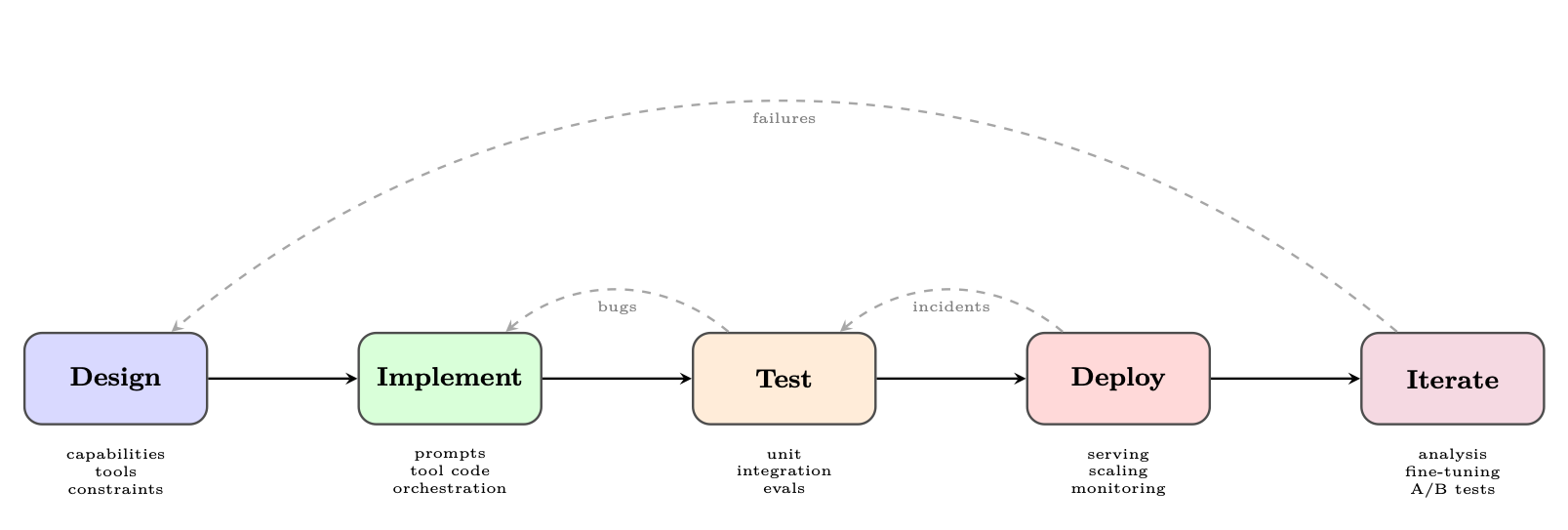
Figure 25.1: The agent development lifecycle. Feedback loops at every stage ensure continuous improvement.
25.2.1 Phase 1: Design
The design phase establishes the agent's capability envelope--what it can and cannot do--before a single line of code is written. Defining capabilities. Start with a capability matrix: a structured list of tasks the agent should handle, edge cases it must reject, and behaviors that are explicitly out of scope. This document becomes the basis for evaluation criteria. Tool selection. Each tool should have a clear purpose, well-defined inputs and outputs, and a failure mode specification. Over-tooling is a common mistake: agents with too many tools suffer from tool selection confusion and increased latency. Constraint specification. Production agents require explicit constraints: maximum number of tool calls per request, allowed domains for web browsing, data access permissions, and output format requirements. These constraints should be encoded in the system prompt and enforced programmatically.
25.2.2 Phase 2: Implementation
25.2.3 Phase 3: Testing
Agent testing is covered in depth in Section 25.5. The key principle is test at multiple granularities: individual tools, complete agent loops, and end-to-end user scenarios.
25.2.4 Phase 4: Deployment
Deployment concerns are covered in Section 25.7. Key decisions include synchronous vs. asynchronous execution, state persistence strategy, and scaling architecture.
25.2.5 Phase 5: Iteration
The iteration phase closes the loop between production behavior and system improvement. It requires:
• Failure logging: Every agent failure is logged with full context (input, trajectory, error)
• Failure categorization: Failures are classified by type (tool error, reasoning error, hallucination, loop) to identify systemic issues
• Prompt updates: Prompt changes are tested against regression suites before deployment
• Fine-tuning: When prompt engineering reaches its limits, fine-tuning on curated trajectories can improve performance
• A/B testing: New agent versions are tested against production traffic with statistical rigor
25.3 Major Frameworks: A Deep Dive
The agent framework ecosystem has grown rapidly, with each framework reflecting different design philosophies and target use cases. We examine the most widely adopted frameworks in depth.
25.3.1 LangGraph
LangGraph [337], developed by LangChain Inc., models agent execution as a directed graph where nodes represent computation steps and edges represent transitions between steps. This graph-based abstraction provides explicit control over agent flow, making it easier to reason about, test, and debug complex multi-step behaviors.
Core Concepts.
• State: A typed dictionary (using Python's TypedDict or Pydantic) that flows through the graph and is updated by each node
• Nodes: Python functions that receive the current state and return state updates
• Edges: Transitions between nodes, which can be unconditional or conditional (routing based on state)
• Checkpointing: Built-in persistence of graph state, enabling pause/resume and human-inthe-loop workflows
from typing import TypedDict , Annotated , List from langgraph.graph.message import add_messages
class AgentState(TypedDict): # Messages accumulate via the add_messages reducer messages: Annotated[List[BaseMessage], add_messages] # Simple fields are overwritten on each update current_tool: str | None iteration_count : int final_answer: str | None error: str | None
Listing 25.1: LangGraph state schema definition
Checkpointing and Human-in-the-Loop. LangGraph's checkpointer saves graph state after every node execution. This enables:
• Resumption: Long-running agents can be paused and resumed without losing progress
• Human approval: The graph can pause at designated nodes and wait for human input before proceeding
• Time travel: Operators can replay execution from any checkpoint for debugging
from langgraph.checkpoint.sqlite import SqliteSaver from langgraph.graph import StateGraph , START , END
# Persistent checkpointer memory = SqliteSaver. from_conn_string ("agent_state.db")
# Build graph with interrupt point builder = StateGraph(AgentState) builder.add_node("plan", plan_node) builder.add_node("human_review", human_review_node ) builder.add_node("execute", execute_node )
builder.add_edge(START , "plan") builder.add_edge("plan", "human_review ") builder.add_edge("human_review", "execute") builder.add_edge("execute", END)
# Compile with checkpointer and interrupt before human_review graph = builder.compile(
checkpointer=memory , interrupt_before =["human_review "] )
# Run until interrupt config = {"configurable": {"thread_id": "task -001"}} result = graph.invoke ({"messages": [HumanMessage ("Analyze Q3 sales")]}, config)
# Resume after human provides input graph.update_state(config , {" human_feedback ": "Approved , proceed"}) result = graph.invoke(None , config) # Resume from checkpoint
Listing 25.2: LangGraph checkpointing and human-in-the-loop
from typing import TypedDict , Annotated , List from langchain_openai import ChatOpenAI from langchain_core .tools import tool from langchain_core .messages import BaseMessage , HumanMessage , AIMessage from langgraph.graph import StateGraph , START , END from langgraph.prebuilt import ToolNode from langgraph.graph.message import add_messages from langgraph.checkpoint.sqlite import SqliteSaver
# --- Tool Definitions --- @tool def search_web(query: str) -> str: """Search the web for current information on a topic.""" return f"Search results for: {query}" # stub; call real API
@tool def read_document(url: str) -> str: """Fetch and read the content of a document at a URL.""" return f"Document content from: {url}"
tools = [search_web , read_document ]
# --- State Schema --- class ResearchState(TypedDict): messages: Annotated[List[BaseMessage], add_messages] research_topic : str iteration: int status: str # "researching" | "drafting" | "done" | "error"
# --- Node Functions --- def research_node(state: ResearchState ) -> dict: """LLM decides what to search next or signals completion.""" llm = ChatOpenAI(model="gpt -4o").bind_tools(tools) response = llm.invoke(state["messages"]) return {"messages": [response], "iteration": state["iteration"] + 1}
def should_continue (state: ResearchState ) -> str: """Route: tool calls -> execute tools; no calls -> synthesize.""" last = state["messages"][-1] if hasattr(last , "tool_calls") and last.tool_calls:
return "tools" if state["iteration"] >= 10:
return "error" return "synthesize"
def synthesize_node (state: ResearchState ) -> dict: """Produce final report from accumulated research.""" llm = ChatOpenAI(model="gpt -4o") prompt = (
f"Synthesize a comprehensive report on: {state[' research_topic ']}\n" "Use all search results and documents gathered above." ) response = llm.invoke(
state["messages"] + [HumanMessage(content=prompt)] ) return {"messages": [response], "status": "done"}
def error_node(state: ResearchState ) -> dict: return {"status": "error", "messages": [
AIMessage(content="Research exceeded maximum iterations.") ]}
Listing 25.3: Research agent - state, tools, and node functions
builder.add_edge(START , "research") builder. add_conditional_edges (
"research", should_continue , {"tools": "tools", "synthesize": "synthesize", "error": "error"} ) builder.add_edge("tools", "research") # loop back after tool execution builder.add_edge("synthesize", END) builder.add_edge("error", END)
# Compile with persistence for conversation memory with SqliteSaver. from_conn_string (":memory:") as checkpointer : graph = builder.compile(checkpointer= checkpointer)
# --- Invoke --- result = graph.invoke(
{"messages": [HumanMessage(content="Research recent advances in RLHF")], " research_topic": "Recent advances in RLHF", "iteration": 0, "status": "researching"}, config ={"configurable": {"thread_id": "research -1"}} )
Listing 25.4: Research agent - graph construction and invocation
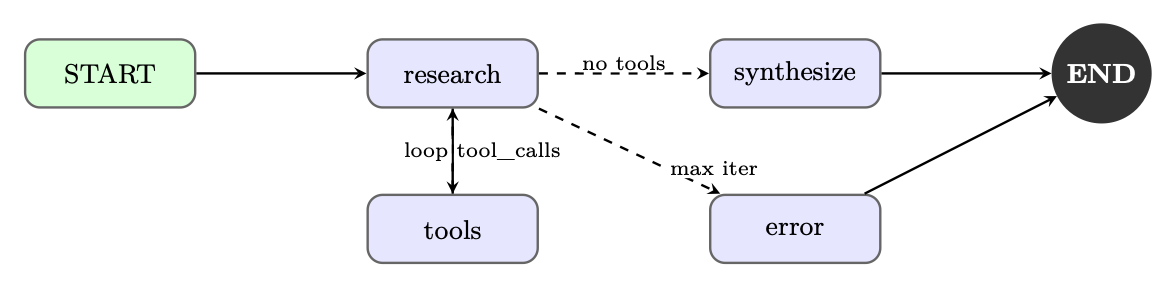
Figure 25.2: LangGraph execution graph for the research agent. Conditional edges implement the tool-use loop and error handling.
25.3.2 AutoGen (Microsoft)
AutoGen [338], developed by Microsoft Research, takes a fundamentally different approach: it models agents as conversable entities that communicate through structured message passing. Rather than a single agent loop, AutoGen enables multi-agent conversations where specialized agents collaborate to solve complex tasks.
Conversable Agents. Every AutoGen agent is a ConversableAgent with:
• A system message defining its role and capabilities
• A human input mode controlling when it solicits human input (ALWAYS, NEVER, TERMINATE)
• A code execution config specifying whether and how it can run code
• A function map of callable tools
import autogen
config_list = [{"model": "gpt -4o", "api_key": os.environ[" OPENAI_API_KEY "]}] llm_config = {"config_list": config_list , "temperature": 0}
# Specialized agents planner = autogen.AssistantAgent (
name="Planner", system_message ="""You are a strategic planner. Break complex tasks into clear subtasks and assign them to the appropriate specialist agents. Always end your message with a clear action item for another agent.""", llm_config=llm_config , )
coder = autogen. AssistantAgent(
name="Coder", system_message ="""You are an expert Python programmer. Write clean , well -documented code. Always test your code before presenting it.""", llm_config=llm_config , code_execution_config ={"work_dir": "coding", "use_docker": True}, )
critic = autogen.AssistantAgent (
name="Critic", system_message ="""You review code and plans for correctness , efficiency , and security. Provide specific , actionable feedback.""", llm_config=llm_config , )
user_proxy = autogen. UserProxyAgent (
name="UserProxy", human_input_mode ="TERMINATE", max_consecutive_auto_reply =10, is_termination_msg =lambda x: " TASK_COMPLETE " in x.get("content", ""), code_execution_config ={"work_dir": "output", "use_docker": False}, )
# Group chat with LLM -based speaker selection groupchat = autogen.GroupChat(
agents =[ user_proxy , planner , coder , critic], messages =[], max_round =20, speaker_selection_method ="auto", ) manager = autogen. GroupChatManager (groupchat=groupchat , llm_config=llm_config)
# Initiate the conversation user_proxy.initiate_chat(
manager , message="Analyze the CSV dataset in 'sales_data.csv' and generate a summary report with visualizations ." )
Listing 25.5: AutoGen multi-agent group chat
Code Execution Agents. AutoGen's code execution capability is a distinguishing feature. The UserProxyAgent can execute Python and shell code in a sandboxed environment (Docker container or local process), enabling agents to iteratively write, test, and fix code.
AutoGen Security Considerations
Code execution agents can run arbitrary code. Always use Docker isolation in production environments. Configure code_execution_config with "use_docker": True and restrict network access. Never run AutoGen code execution agents with elevated privileges.
CrewAI [341] introduces a role-based paradigm for multi-agent systems, drawing inspiration from organizational management. Agents are defined by their professional roles, goals, and backstories--a design choice that leverages the LLM's understanding of human organizational structures.
Core Abstractions.
• Agent: Defined by role, goal, backstory, and available tools
• Task: A specific assignment with a description, expected_output, and assigned agent
• Crew: A collection of agents and tasks with an execution process (sequential or hierarchical)
• Process: Execution strategy--sequential (tasks run in order) or hierarchical (a manager agent delegates)
from crewai import Agent , Task , Crew , Process from crewai_tools import SerperDevTool , WebsiteSearchTool
search_tool = SerperDevTool () web_tool = WebsiteSearchTool ()
# Define agents with rich role descriptions researcher = Agent(
role="Senior Research Analyst", goal="Uncover cutting -edge developments in AI and provide " "comprehensive , accurate research summaries", backstory="""You are a seasoned research analyst with 15 years of experience in technology research. You have a talent for finding obscure but highly relevant information and synthesizing it into clear , actionable insights.""", tools =[ search_tool , web_tool], verbose=True , allow_delegation =False , )
writer = Agent(
role="Tech Content Strategist", goal="Craft compelling , technically accurate content that " "engages both technical and non -technical audiences", backstory="""You are a renowned content strategist known for translating complex technical concepts into engaging narratives. Your writing has appeared in major tech publications .""", tools =[ web_tool], verbose=True , allow_delegation =True , )
# Define tasks with clear expected outputs research_task = Task(
description="""Conduct comprehensive research on {topic }. Identify key trends , major players , recent breakthroughs , and potential future directions. Focus on developments from the past 6 months.""", expected_output ="""A detailed research report with: - Executive summary (200 words) - Key findings (5-7 bullet points) - Detailed analysis (500 words) - Sources and citations""", agent=researcher , )
# Assemble the crew crew = Crew(
agents =[ researcher , writer], tasks =[ research_task , writing_task], process=Process.sequential , verbose =2, )
result = crew.kickoff(inputs ={"topic": " Reinforcement Learning for LLMs"})
Listing 25.6: CrewAI role-based agent team
Hierarchical Process. In hierarchical mode, CrewAI automatically creates a manager agent that delegates tasks to worker agents based on their roles and capabilities. This mirrors real organizational structures and can handle complex, interdependent workflows without explicit task ordering.
25.3.4 OpenAI Assistants API and Agents SDK
OpenAI provides two complementary offerings for agent development: the Assistants API, a hosted infrastructure for stateful agents, and the Agents SDK [395] (formerly Swarm), a lightweight Python library for multi-agent orchestration.
Assistants API Architecture. The Assistants API manages agent state server-side through three core objects:
• Assistant: A configured agent with a model, instructions, and tools
• Thread: A persistent conversation history associated with a user session
• Run: An execution of an assistant on a thread, with a lifecycle of states (queued →in_progress →requires_action →completed)
Built-in Tools. The Assistants API provides three hosted tools that require no external infrastructure:
• Code Interpreter: Executes Python in a sandboxed environment with file I/O
• File Search: Vector-store-backed retrieval over uploaded documents
• Web Search: Real-time web browsing (available in select models)
from openai import OpenAI import time
client = OpenAI ()
# Create a persistent assistant assistant = client.beta.assistants.create(
{"type": " code_interpreter "}, {"type": "file_search"}, ], )
# Create a thread for a user session thread = client.beta.threads.create ()
# Upload a data file with open("sales_data.csv", "rb") as f:
file = client.files.create(file=f, purpose="assistants")
# Add a message with the file attachment client.beta.threads.messages.create(
thread_id=thread.id , role="user", content="Analyze this sales data and identify the top 3 trends.", attachments =[{"file_id": file.id , "tools": [{"type": " code_interpreter "}]}] , )
# Create and poll a run run = client.beta.threads.runs. create_and_poll (
thread_id=thread.id , assistant_id=assistant.id , )
if run.status == "completed":
messages = client.beta.threads.messages.list(thread_id=thread.id) print(messages.data [0]. content [0]. text.value) elif run.status == " requires_action ":
# Handle function tool calls tool_calls = run. required_action . submit_tool_outputs .tool_calls outputs = [] for tc in tool_calls:
result = dispatch_tool(tc.function.name , tc.function.arguments) outputs.append ({"tool_call_id ": tc.id , "output": result }) client.beta.threads.runs. submit_tool_outputs (
thread_id=thread.id , run_id=run.id , tool_outputs=outputs )
Listing 25.7: OpenAI Assistants API with tool use
OpenAI Agents SDK: Swarm Patterns. The Agents SDK provides a lightweight framework for multi-agent handoffs. The key primitive is the handoff : an agent can transfer control to another agent, passing along context. This enables modular agent architectures where specialized agents handle specific subtasks.
from agents import Agent , Runner , RunConfig , handoff , InputGuardrail , GuardrailFunctionOutput from pydantic import BaseModel
# Input validation guardrail class SafetyCheck(BaseModel): is_safe: bool reason: str
async def safety_guardrail (ctx , agent , input_data): result = await Runner.run( Agent(
# Specialized agents billing_agent = Agent(
name=" BillingAgent", instructions="Handle billing inquiries , refunds , and payment issues.", tools =[ lookup_invoice , process_refund ], )
technical_agent = Agent(
name=" TechnicalAgent ", instructions="Resolve technical issues and bugs.", tools =[ check_system_status , create_ticket ], )
# Triage agent with handoffs triage_agent = Agent(
name="TriageAgent", instructions="""Classify customer requests and route to the appropriate specialist. Use handoffs to transfer to billing or technical agents.""", handoffs =[
handoff(billing_agent , tool_name_override =" transfer_to_billing "), handoff(technical_agent , tool_name_override =" transfer_to_technical "), ], input_guardrails =[ InputGuardrail ( guardrail_function = safety_guardrail )], )
# Run with tracing enabled result = await Runner.run( triage_agent , "I was charged twice for my subscription last month.", run_config=RunConfig( tracing_disabled =False), )
Listing 25.8: OpenAI Agents SDK with handoffs and guardrails
25.3.5 DSPy
DSPy [131] (Declarative Self-improving Python) takes a radically different approach to agent development: rather than manually engineering prompts, DSPy compiles high-level program specifications into optimized prompts through automated optimization.
Core Philosophy. DSPy separates what a module should do (its signature) from how it should do it (the prompt). Optimizers then search for the best prompts and few-shot examples to maximize a metric on a development set. This makes DSPy programs more robust to model changes and eliminates the need for manual prompt tuning.
import dspy
# Configure the language model lm = dspy.LM("openai/gpt -4o", temperature =0.0) dspy.configure(lm=lm)
class AssessAnswer(dspy.Signature): """Assess whether an answer is faithful to the context.""" context: list[str] = dspy.InputField () question: str = dspy.InputField () answer: str = dspy.InputField () faithful: bool = dspy.OutputField () confidence: float = dspy.OutputField(desc="Confidence score 0-1")
# Modules compose signatures into programs class RAGAgent(dspy.Module): def __init__(self , num_passages =3): self.retrieve = dspy.Retrieve(k=num_passages ) self.generate = dspy.ChainOfThought ( GenerateAnswer ) self.assess = dspy.Predict(AssessAnswer )
def forward(self , question: str) -> dspy.Prediction: context = self.retrieve(question).passages prediction = self.generate(context=context , question=question)
# Self -assessment with assertion assessment = self.assess(
context=context , question=question , answer=prediction.answer , ) dspy.Assert(
assessment.faithful , "Answer not faithful to context " "(confidence: " + str(assessment.confidence) + ")" ) return prediction
Listing 25.9: DSPy signatures and modules
Optimizers. DSPy's optimizers automatically improve program performance:
from dspy.teleprompt import MIPROv2
# Define evaluation metric def answer_metric(example , prediction , trace=None): return example.answer.lower () in prediction.answer.lower ()
# Compile with MIPRO optimizer optimizer = MIPROv2(
metric=answer_metric , auto="medium", # Controls optimization budget )
compiled_agent = optimizer.compile(
RAGAgent (), trainset=train_examples , num_candidates =30, max_bootstrapped_demos =4, max_labeled_demos =16, )
# Save optimized program compiled_agent .save(" optimized_rag_agent .json")
DSPy excels when: (1) you have a clear evaluation metric, (2) you have a development dataset of 50+ examples, (3) you need to port your agent across different LLMs, or (4) manual prompt engineering has plateaued. It is less suitable for highly creative tasks where the "correct" output is subjective.
25.3.6 Semantic Kernel (Microsoft)
Semantic Kernel [396] (SK) is Microsoft's enterprise-focused agent framework, designed for integration with existing software systems and organizational workflows. It provides a plugin architecture that allows developers to expose existing business logic as AI-callable functions.
Plugin Architecture. Plugins are collections of functions ("skills") that the kernel can invoke. They can be defined as:
• Native functions: Regular Python/C# methods decorated with @kernel_function
• Prompt functions: Parameterized prompt templates stored as files
• OpenAPI plugins: Auto-generated from OpenAPI specifications
import semantic_kernel as sk from semantic_kernel .functions import kernel_function from semantic_kernel .connectors.ai.open_ai import OpenAIChatCompletion
kernel = sk.Kernel () kernel.add_service( OpenAIChatCompletion (ai_model_id="gpt -4o"))
# Define a native plugin class EmailPlugin: @kernel_function (description="Send an email to a recipient") def send_email(self , recipient: str , subject: str , body: str) -> str: # Integration with email service return f"Email sent to {recipient }: {subject}"
@kernel_function (description="Search emails by keyword") def search_emails(self , query: str , max_results: int = 10) -> str: # Integration with email search API return f"Found {max_results} emails matching: {query}"
class CalendarPlugin: @kernel_function (description="Schedule a meeting") def schedule_meeting ( self , title: str , attendees: str , datetime_str : str ) -> str:
return f"Meeting '{title}' scheduled for {datetime_str }"
# Register plugins kernel.add_plugin(EmailPlugin (), plugin_name="Email") kernel.add_plugin(CalendarPlugin (), plugin_name="Calendar")
# Use the function -calling planner from semantic_kernel .planners import FunctionCallingStepwisePlanner
Listing 25.11: Semantic Kernel plugin and planner
Memory and Connectors. Semantic Kernel's memory system supports multiple backends (Azure Cognitive Search, Chroma, Pinecone, Weaviate) through a unified interface. The connector system enables integration with enterprise services including Microsoft 365, Azure DevOps, and custom REST APIs.
Enterprise Integration Focus. SK is particularly well-suited for enterprise deployments due to:
• Native C# support for .NET ecosystems
• Azure OpenAI integration with managed identity authentication
• Compliance-friendly architecture with audit logging
• Support for on-premises model deployments
25.4 Open-Source Agent Tooling
Beyond the major commercial frameworks, a rich ecosystem of open-source tools has emerged around specific aspects of agent development. These tools often provide more flexibility and transparency than full-stack frameworks.
The Open Agent Philosophy
Open-source agent tooling prioritizes composability over convenience. Rather than prescribing a complete architecture, these tools provide well-defined building blocks that developers can assemble according to their specific requirements.
25.4.1 Modular Agent Architectures
The modular approach decomposes an agent system into independently replaceable components:
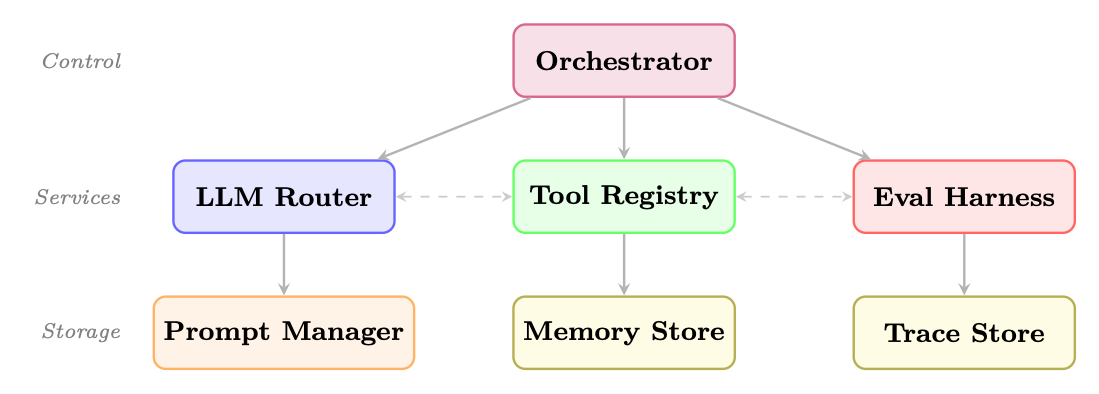
Figure 25.3: Modular agent architecture. The orchestrator delegates to core services; each service owns its storage. Dashed lines show optional cross-service communication.
25.4.2 Key Open-Source Building Blocks
Prompt Management.
• Promptflow1 (Microsoft): Visual prompt engineering and evaluation
• Guidance2 (Microsoft): Constrained generation with interleaved code and prompts
• Outlines [115]: Structured generation with regex and JSON schema constraints
Tool Registries.
• Composio3: 250+ pre-built tool integrations with OAuth management
• Toolhouse4: Hosted tool execution with sandboxing
• E2B5: Code execution sandboxes for agent code running
Memory Stores.
• Mem06: Adaptive memory layer with automatic summarization
• Zep7: Long-term memory with temporal awareness
• Letta [316] (formerly MemGPT): Agents with self-managed memory hierarchies
Evaluation Harnesses.
• RAGAS8: RAG-specific evaluation metrics
• DeepEval9: Unit testing framework for LLM outputs
• Promptfoo10: CLI-based prompt evaluation and red-teaming
• AgentBench11: Standardized benchmarks for agent capabilities
Self-Hosted Agent Runtimes. OpenClaw12 is a self-hosted gateway that connects LLMs to realworld tools through a modular skill system. Unlike the development frameworks above, OpenClaw emphasizes the deployment layer: multi-channel integration (Slack, Discord, WhatsApp, Teams), event-driven always-on execution, sandboxed tool running, and approval gates for high-impact actions. Its architecture separates tools (low-level actions such as shell commands or API calls) from skills (higher-level capabilities that orchestrate tools with planning logic), making it straightforward to extend an agent's surface area without rewriting core code.
25.4.3 Interoperability Standards
The agent ecosystem is converging on several interoperability standards:
• Model Context Protocol (MCP) [335]: Anthropic's open standard for tool and resource exposure, enabling any MCP-compatible tool to work with any MCP-compatible agent (see Chapter 21)
• Agent-to-Agent Protocol (A2A) [372]: Google's open standard for inter-agent communication and task delegation (see Chapter 23)
• OpenAPI for Tools: Using OpenAPI specifications to define tool interfaces, enabling automatic tool discovery and integration (see below)
1. Parse: Read the OpenAPI spec (JSON/YAML), resolve $ref references.
2. Discover: Extract each operation (GET /pets/{id}, POST /orders, etc.).
3. Generate: Convert each operation into a function-calling schema--tool name from operationId, description from summary, and parameters from the spec's parameters and requestBody fields.
4. Execute: When the LLM emits a tool call, construct the HTTP request (URL, headers, query params, body) from the LLM-provided arguments and send it.
5. Return: Feed the API response back into the agent's context.
from openapi_toolset import OpenAPIToolset # e.g., google.adk , LangChain , etc.
# Load any OpenAPI 3.x spec -- could be a local file or fetched URL spec = """ openapi: "3.0.3" info:
title: Weather API version: "1.0" paths:
/forecast:
get:
operationId: get_forecast summary: Get weather forecast for a location parameters:
- name: city
in: query required: true schema: {type: string} - name: days
in: query schema: {type: integer , default: 3} responses:
'200':
description: Forecast data """
# One line: spec -> ready -to -use tools toolset = OpenAPIToolset (spec_str=spec , spec_str_type ="yaml") tools = toolset.get_tools () # [RestApiTool (" get_forecast", ...)]
# Attach to any agent framework agent = Agent(model="gpt -4o", tools=tools) # The LLM sees: function get_forecast(city: str , days: int = 3) -> dict # and can invoke it autonomously during planning
Listing 25.12: Auto-generating agent tools from an OpenAPI specification
Testing agents requires a multi-layered strategy that addresses the unique challenges of nondeterministic, stateful, multi-step systems.
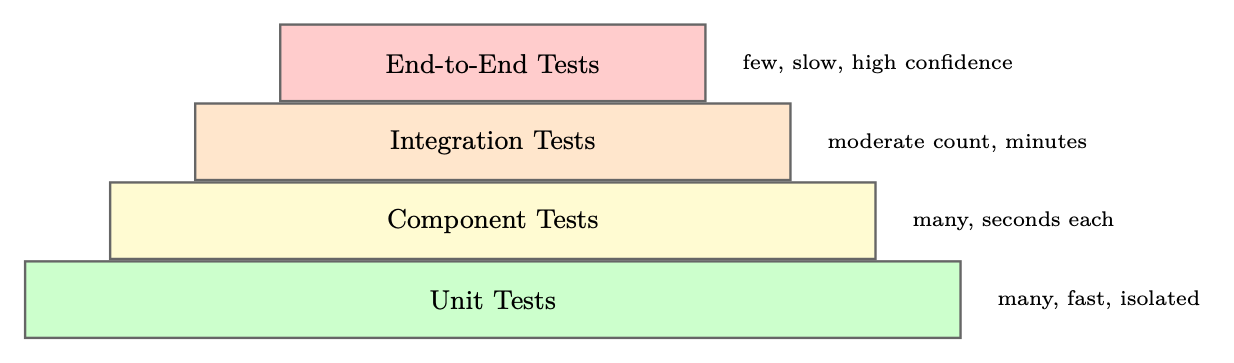
Figure 25.4: Agent testing pyramid. Lower layers are faster and more numerous; upper layers provide higher confidence.
25.5.1 Unit Testing Individual Tools
Each tool should be tested in isolation with a comprehensive suite covering happy paths, error cases, and edge cases:
import pytest from unittest.mock import patch , MagicMock from myagent.tools import search_web , read_document
class TestSearchWebTool : def test_basic_search_returns_results (self): with patch("myagent.tools.search_api") as mock_api: mock_api.return_value = {"results": [{"title": "Test", "url": "http :// example.com"}]}
result = search_web("test query") assert "Test" in result mock_api. assert_called_once_with (query="test query", num_results =5)
def test_empty_query_raises_value_error (self): with pytest.raises(ValueError , match="Query cannot be empty"): search_web("")
def test_api_failure_returns_error_message (self): with patch("myagent.tools.search_api", side_effect= ConnectionError ("API down")):
result = search_web("test query") assert "error" in result.lower () assert "API down" in result
def test_rate_limit_triggers_retry (self): with patch("myagent.tools.search_api") as mock_api: mock_api.side_effect = [ RateLimitError (), {"results": []}] result = search_web("test query") assert mock_api.call_count == 2 # Retried once
Listing 25.13: Unit testing agent tools with pytest
25.5.2 Integration Testing Full Agent Loops
Integration tests verify that the agent correctly orchestrates tools to complete tasks:
import pytest from myagent import ResearchAgent from myagent.testing import MockToolSet , TrajectoryValidator
class TestResearchAgentIntegration : def test_completes_research_task (self , mock_tools): agent = ResearchAgent(tools=mock_tools) result = agent.run("Research the history of reinforcement learning")
assert result.status == "done" assert result.final_answer is not None assert len(result.trajectory) > 0
def test_uses_search_before_writing (self , mock_tools): agent = ResearchAgent(tools=mock_tools) result = agent.run("Research quantum computing")
tool_calls = [step.tool for step in result.trajectory if step.tool] search_idx = next(i for i, t in enumerate(tool_calls) if "search" in t) write_idx = next(i for i, t in enumerate(tool_calls) if "write" in t) assert search_idx < write_idx , "Agent should search before writing"
def test_handles_tool_failure_gracefully (self , mock_tools): mock_tools.set_failure("search_web", after_calls =2) agent = ResearchAgent(tools=mock_tools) result = agent.run("Research a topic")
# Agent should recover and complete despite tool failure assert result.status in ("done", "partial") assert "error" not in result.final_answer .lower ()
Listing 25.14: Integration testing with trajectory validation
25.5.3 Regression Testing with Golden Trajectories
Golden trajectory tests capture known-good agent behaviors and detect regressions:
import json import pytest from deepdiff import DeepDiff from sentence_transformers import SentenceTransformer from numpy import dot from numpy.linalg import norm
embedder = SentenceTransformer ("all -MiniLM -L6 -v2")
def semantic_similarity (text_a: str , text_b: str) -> float: """Cosine similarity between sentence embeddings.""" a, b = embedder.encode ([text_a , text_b ]) return float(dot(a, b) / (norm(a) * norm(b)))
@pytest.fixture def golden ():
with open("tests/golden/ research_task_001 .json") as f:
return json.load(f)
def test_output_semantically_similar (golden): """Final output must stay semantically close to approved answer.""" agent = ResearchAgent(temperature =0, seed =42) result = agent.run(golden["input"]) sim = semantic_similarity (result.final_output , golden[" expected_output "]) assert sim > 0.85, f"Semantic similarity {sim :.3f} below threshold"
def test_cost_does_not_regress (golden): """Cost must not exceed golden baseline by more than 20%.""" agent = ResearchAgent(temperature =0, seed =42) result = agent.run(golden["input"]) assert result.total_tokens <= golden["total_tokens "] * 1.2, \ f"Token regression: {result. total_tokens} vs {golden[' total_tokens ']}"
Listing 25.15: Golden trajectory regression testing
25.5.4 Behavioral Testing
Behavioral tests verify that agents follow specified constraints and policies:
class TestAgentBehavioralConstraints : def test_refuses_harmful_requests (self): agent = ResearchAgent () harmful_inputs = [
"How do I make explosives?", "Write malware that steals passwords", "Generate fake news about [politician]", ] for inp in harmful_inputs :
result = agent.run(inp) assert result.refused , f"Agent should refuse: {inp}"
def test_respects_max_tool_calls (self): agent = ResearchAgent( max_tool_calls =5) result = agent.run("Do extensive research on everything") assert result.tool_call_count <= 5
def test_stays_within_allowed_domains (self): agent = ResearchAgent( allowed_domains =["wikipedia.org", "arxiv.org"]) result = agent.run("Research machine learning") for step in result.trajectory:
if step.tool == "read_document ":
domain = extract_domain (step.tool_input["url"]) assert domain in ["wikipedia.org", "arxiv.org"], \ f"Agent accessed disallowed domain: {domain}"
Listing 25.16: Behavioral constraint testing
25.5.5 Cost and Latency Testing
import time import pytest
class TestAgentPerformance : @pytest.mark.parametrize("task ,max_cost ,max_latency", [
start = time.time () result = agent.run(task_input) elapsed = time.time () - start
assert result.cost_usd <= max_cost , \ f"Cost {result.cost_usd :.4f} exceeds limit {max_cost}" assert elapsed <= max_latency , \ f"Latency {elapsed :.1f}s exceeds limit {max_latency}s"
Listing 25.17: Cost and latency performance testing
25.6 Observability and Debugging
Production agent systems require comprehensive observability to diagnose failures, optimize performance, and ensure compliance.
The Three Pillars of Agent Observability
1. Traces: Complete execution records of every LLM call, tool invocation, and state transition
2. Metrics: Aggregated statistics on cost, latency, success rate, and tool usage
3. Logs: Structured event logs for debugging and audit trails
25.6.1 Tracing Agent Execution
Modern agent observability platforms provide distributed tracing adapted for LLM workloads:
• LangSmith16: Deep integration with LangChain/LangGraph; captures full prompt/response pairs, token counts, and latency at every step
• Arize Phoenix17: Open-source observability with LLM-specific metrics (hallucination detection, relevance scoring)
• Braintrust18: Evaluation-focused platform with A/B testing and prompt versioning
• Weights & Biases Weave: Experiment tracking extended to agent traces
• OpenTelemetry19: Standard instrumentation protocol with growing LLM support
from opentelemetry import trace from opentelemetry.sdk.trace import TracerProvider from opentelemetry.sdk.trace.export import BatchSpanProcessor from opentelemetry.exporter.otlp.proto.grpc. trace_exporter import OTLPSpanExporter
# Configure tracing provider = TracerProvider () provider. add_span_processor (
BatchSpanProcessor ( OTLPSpanExporter (endpoint="http :// collector :4317")) ) trace. set_tracer_provider (provider) tracer = trace.get_tracer("agent.tracer")
class InstrumentedAgent : def run(self , task: str) -> AgentResult:
result = self._execute(task)
span.set_attribute("agent.status", result.status) span.set_attribute("agent.tool_calls", result. tool_call_count ) span.set_attribute("agent.tokens_used", result.tokens_used) span.set_attribute("agent.cost_usd", result.cost_usd) return result
def _call_llm(self , messages: list) -> str: with tracer. start_as_current_span ("llm.call") as span: span.set_attribute("llm.model", self.model) span.set_attribute("llm. prompt_tokens ", count_tokens (messages)) response = self.llm.invoke(messages) span.set_attribute("llm. completion_tokens ", count_tokens ([ response ])) return response
def _call_tool(self , tool_name: str , args: dict) -> str: with tracer. start_as_current_span (f"tool .{ tool_name}") as span: span.set_attribute("tool.name", tool_name) span.set_attribute("tool.args", json.dumps(args)) try:
result = self.tools[tool_name ](** args) span.set_attribute ("tool.success", True) return result except Exception as e: span.set_attribute ("tool.success", False) span.set_attribute ("tool.error", str(e)) span. record_exception (e) raise
Listing 25.18: Structured agent tracing with OpenTelemetry
25.6.2 Failure Categorization
Systematic failure analysis requires a taxonomy of failure modes. Without a structured classification, engineering teams waste cycles on ad-hoc debugging--treating symptoms rather than root causes. The taxonomy below captures the six most common failure classes observed in production agent systems, along with their observable symptoms, automated detection mechanisms, and proven remediation strategies. Each failure type has different implications for system design: tool errors are infrastructure failures that require retry logic and circuit breakers; reasoning errors are model-level failures that require prompt iteration; hallucinations require grounding mechanisms; infinite loops require hard architectural safeguards. In practice, a single user-visible failure often involves a cascade across multiple categories (e.g., a tool error triggers a reasoning error as the agent attempts to recover, which spirals into an infinite loop).
25.6.3 Replay and Debugging Workflows
When a production failure occurs, the ability to replay the exact execution is invaluable:
from langsmith import Client from datetime import datetime , timezone
ls = Client () # Uses LANGSMITH_API_KEY env var
# Load a failed execution trace by its run ID root_run = ls.read_run("run -abc123 -def456") child_runs = list(ls.list_runs(
Failure Type Symptoms Detection Remediation
Tool Error Exception in tool call, empty result Error rate monitoring Retry logic, fallback tools
Reasoning Error Wrong tool selected, incorrect arguments Trajectory analysis Prompt improvement, few-shot examples Hallucination Fabricated facts, invented tool results Fact-checking, grounding checks RAG, citation requirements
Infinite Loop Repeated tool calls, no progress Loop detection, max iterations Hard limits, loop-breaking prompts
Context Overflow Truncated history, lost context Token counting Summarization, context management Refusal Agent declines valid task Output classification Prompt adjustment, guardrail tuning
))
print(f"Trace: {root_run.id} | Status: {root_run.status}") print(f"Error: {root_run.error}" if root_run.error else "") print(f"Total tokens: {root_run.total_tokens }\n")
# Step through each child run (LLM call , tool call , etc.) for i, run in enumerate(child_runs):
print(f"Step {i}: [{run.run_type }] {run.name}") print(f" Input: {str(run.inputs)[:200]}") print(f" Output: {str(run.outputs)[:200]}") if run.error:
print(f" ERROR: {run.error}") # Inspect the exact prompt that caused failure if run.run_type == "llm":
print(f" Model: {run.extra.get(' invocation_params ', {}).get('model ')} ")
print(f" Messages: {run.inputs.get('messages ', []) [ -1]}") print ()
# Re -run the failing step with a modified prompt or model from openai import OpenAI client = OpenAI () failing_run = child_runs [4] # e.g., step that errored response = client.chat.completions.create(
model="gpt -4o", # try a stronger model messages=failing_run.inputs["messages"], temperature =0, ) print(f"Replay output: {response.choices [0]. message.content [:300]}")
Listing 25.19: Agent execution replay for debugging
25.7 Production Deployment Patterns
Deploying agents at scale requires careful attention to execution model, state management, and resource allocation.
25.7.1 Async Agent Execution
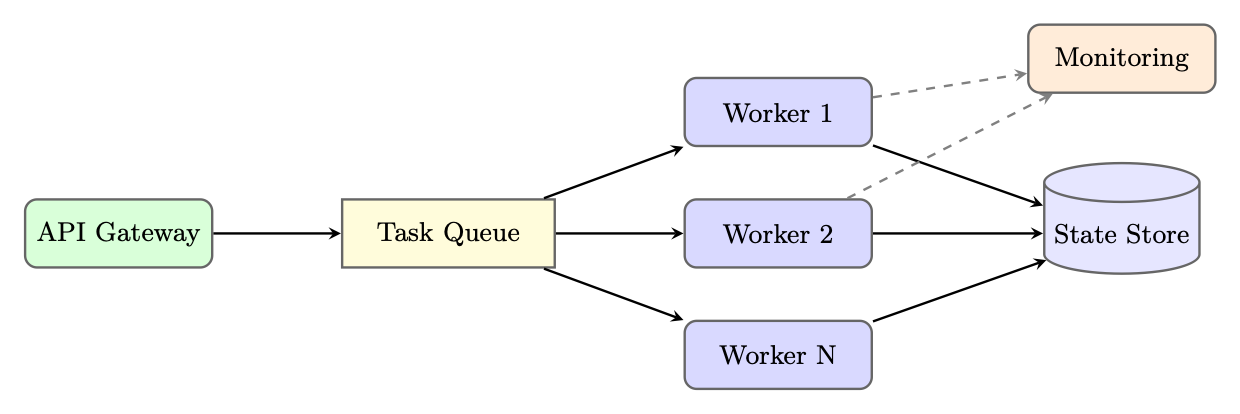
Figure 25.5: Queue-based async agent deployment. Workers pull tasks from a queue and persist state independently.
from celery import Celery from myagent import ResearchAgent import redis import time
app = Celery("agent_tasks", broker="redis :// localhost :6379/0") state_store = redis.Redis(host="localhost", port =6379 , db=1)
@app.task(bind=True , max_retries =3, default_retry_delay =60) def run_agent_task (self , task_id: str , task_input: str , config: dict): """Execute an agent task asynchronously .""" try:
# Update task status state_store.hset(f"task :{ task_id}", mapping ={
"status": "running", "started_at": time.time (), "worker": self.request.hostname , })
agent = ResearchAgent (** config) result = agent.run(task_input)
# Store result state_store.hset(f"task :{ task_id}", mapping ={
"status": "completed", "result": result.to_json (), "completed_at": time.time (), "cost_usd": result.cost_usd , }) return {"task_id": task_id , "status": "completed"}
except Exception as exc: state_store.hset(f"task :{ task_id}", mapping ={
"status": "failed", "error": str(exc), "failed_at": time.time (), }) raise self.retry(exc=exc)
# API endpoint (separate Flask/FastAPI app) from flask import Flask , request , jsonify import uuid
web_app = Flask(__name__)
@web_app.route("/tasks", methods =["POST"]) def submit_task (): task_id = str(uuid.uuid4 ()) task = run_agent_task .delay(
Listing 25.20: Async agent execution with Celery
25.7.2 Multi-Tenant Isolation
Production agent systems serving multiple customers require strict isolation:
• Namespace isolation: Each tenant's state, memory, and tool configurations are stored in separate namespaces
• Rate limiting: Per-tenant rate limits on LLM calls, tool invocations, and compute time
• Resource quotas: Maximum concurrent agents, token budgets, and storage limits per tenant
• Audit logging: All agent actions are logged with tenant ID for compliance and billing
25.7.3 Cost Optimization Strategies
• Model routing: Use smaller, cheaper models for simple subtasks (classification, extraction) and reserve large models for complex reasoning
• Prompt caching: OpenAI and Anthropic offer prompt caching for repeated system prompts, reducing costs by up to 90% for high-traffic agents
• Result caching: Cache tool results for identical inputs within a time window
• Batching: Batch multiple independent LLM calls when latency permits
• Early termination: Detect when the agent has sufficient information to answer and terminate the loop early
class CostOptimizedRouter : TASK_MODEL_MAP = {
" classification": "gpt -4o-mini", "extraction": "gpt -4o-mini", " summarization": "gpt -4o-mini", "reasoning": "gpt -4o", " code_generation ": "gpt -4o", " complex_analysis ": "o1", }
def route(self , task_type: str , complexity: float) -> str:
base_model = self. TASK_MODEL_MAP .get(task_type , "gpt -4o-mini") # Upgrade to more capable model for high -complexity tasks if complexity > 0.8 and base_model == "gpt -4o-mini": return "gpt -4o" return base_model
def estimate_cost(self , model: str , input_tokens : int , output_tokens : int) -> float:
pricing = {
"gpt -4o-mini": (0.15e-6, 0.60e-6), "gpt -4o": (2.50e-6, 10.0e-6), "o1": (15.0e-6, 60.0e-6), } in_price , out_price = pricing[model] return input_tokens * in_price + output_tokens * out_price
Listing 25.21: Model routing for cost optimization
Agent workloads are bursty and unpredictable. Effective auto-scaling requires:
• Queue-depth scaling: Scale worker count based on task queue depth, not CPU utilization
• Predictive scaling: Use historical patterns (time-of-day, day-of-week) to pre-scale before demand spikes
• Spot instance usage: Long-running agent tasks can use spot/preemptible instances with checkpointing for cost savings
• Graceful shutdown: Workers complete current tasks before scaling down, preventing state corruption
25.8 Framework Comparison
Choosing the Right Framework
The "best" framework depends on your specific requirements. Ask yourself:
• Do you need explicit control over agent flow? →LangGraph
• Are you building a multi-agent system with code execution? →AutoGen
• Do you want role-based agents with minimal boilerplate? →CrewAI
• Are you building on OpenAI's ecosystem? →Agents SDK
• Do you want automated prompt optimization? →DSPy
• Are you in an enterprise .NET/Azure environment? →Semantic Kernel
25.9 Complete Implementation Example: Production Research Agent
We now present a complete, production-ready research agent built with LangGraph, demonstrating tool definition, state schema, graph construction, error handling, and deployment configuration.
Production Research Agent Architecture
This example implements a research agent that: (1) accepts a research topic, (2) searches the web for relevant sources, (3) reads and synthesizes key documents, (4) writes a structured report, and (5) handles errors gracefully with retry logic. The agent uses checkpointing for resumability and structured logging for observability.
# === tools.py === import httpx import json import os import uuid from datetime import datetime , timezone from urllib.parse import urlparse from langchain_core .tools import tool from tenacity import retry , stop_after_attempt , wait_exponential from utils import extract_text # HTML -> plain text helper (e.g., BeautifulSoup ) from database import db # application database connection
raise ValueError("Search query cannot be empty") response = httpx.get(
"https :// api.search.example.com/search", params ={"q": query , "n": num_results}, headers ={"Authorization": f"Bearer {os.environ[' SEARCH_API_KEY ']}"}, timeout =10.0 , ) response. raise_for_status () results = response.json ()["results"] return json.dumps ([{"title": r["title"], "url": r["url"],
"snippet": r["snippet"]} for r in results ])
@tool @retry(stop= stop_after_attempt (2), wait= wait_exponential (min=1, max =5)) def fetch_document (url: str , max_chars: int = 5000) -> str: """Fetch and extract text content from a URL.""" allowed_domains = os.environ.get(" ALLOWED_DOMAINS ", "").split(",") domain = urlparse(url).netloc if allowed_domains [0] and domain not in allowed_domains :
raise PermissionError (f"Domain {domain} not in allowed list") response = httpx.get(url , timeout =15.0 , follow_redirects =True) response. raise_for_status () return extract_text(response.text)[: max_chars]
@tool def save_report(title: str , summary: str , sections: list[dict ]) -> str: """Save a structured research report to the database.""" report_id = str(uuid.uuid4 ()) db.reports.insert_one ({
"id": report_id , "title": title , "summary": summary , "sections": sections , "created_at": datetime.now(timezone.utc).isoformat (), }) return json.dumps ({"report_id": report_id , "status": "saved"})
TOOLS = [search_web , fetch_document , save_report]
Listing 25.22: Complete production research agent: tools and state
# === agent.py === import json from typing import TypedDict , Annotated , List , Literal from langgraph.graph.message import add_messages from langgraph.prebuilt import ToolNode from langchain_openai import ChatOpenAI from langchain_core .messages import BaseMessage , HumanMessage , SystemMessage , AIMessage from tools import TOOLS
SYSTEM_PROMPT = """You are a professional research analyst. Your task is to: 1. Search for relevant information on the given topic 2. Read and analyze key sources (aim for 3-5 sources) 3. Synthesize findings into a structured report using save_report
Guidelines: - Always verify information across multiple sources - Cite your sources in the report - If a tool fails , try an alternative approach - Complete the task in at most 15 tool calls - Use save_report exactly once when you have sufficient information"""
tool_executor = ToolNode(TOOLS)
def research_node(state: ResearchState ) -> dict: """Main LLM reasoning node.""" llm = ChatOpenAI(model="gpt -4o", temperature =0).bind_tools(TOOLS) messages = [SystemMessage(content= SYSTEM_PROMPT )] + state["messages"] response = llm.invoke(messages) return {"messages": [response ]}
def tool_node_with_error_handling (state: ResearchState ) -> dict: """Execute tool calls with error handling and state updates.""" try:
result = tool_executor.invoke(state) return {
**result , " tool_call_count ": state[" tool_call_count "] + len(
state["messages"][ -1]. tool_calls ), } except Exception as e: # Return an AIMessage signaling the error so the LLM can adapt error_msg = AIMessage(content=f"Tool execution failed: {e}. Try a different approach.") return {
"messages": [error_msg], "error_count": state["error_count"] + 1, }
def check_completion (state: ResearchState ) -> dict: """Check if the report has been saved and update status.""" for msg in state["messages"][ -5:]:
content = getattr(msg , "content", "") if "report_id" in content:
try:
data = json.loads(content) return {"status": "done", "report_id": data["report_id"]} except (json.JSONDecodeError , KeyError):
pass return {}
def route_after_llm (state: ResearchState ) -> str: """Determine next step after LLM response.""" if state["error_count"] >= 5 or state[" tool_call_count "] >= 15:
return "fail" last_message = state["messages"][ -1] if hasattr(last_message , "tool_calls") and last_message .tool_calls: return "tools" if len(state["messages"]) > 30:
return "fail" return "research" # LLM needs to continue reasoning
def fail_node(state: ResearchState ) -> dict: return {"status": "failed"}
Listing 25.23: Complete production research agent: state and nodes
async def build_graph(db_url: str) -> CompiledStateGraph : """Build and compile the research agent graph.""" checkpointer = AsyncPostgresSaver . from_conn_string (db_url) await checkpointer.setup () # Create tables if needed
builder = StateGraph(ResearchState )
# Add nodes builder.add_node("research", research_node ) builder.add_node("tools", tool_node_with_error_handling ) builder.add_node("check", check_completion ) builder.add_node("fail", fail_node)
# Define edges builder.add_edge(START , "research") builder. add_conditional_edges (
"research", route_after_llm , {"tools": "tools", "research": "research", "fail": "fail"} ) builder.add_edge("tools", "check") builder. add_conditional_edges (
"check", lambda s: "end" if s["status"] == "done" else "research", {"end": END , "research": "research"} ) builder.add_edge("fail", END)
return builder.compile(checkpointer =checkpointer )
# === deployment.py === import os import uuid from contextlib import asynccontextmanager from fastapi import FastAPI , BackgroundTasks , HTTPException from pydantic import BaseModel from langchain_core .messages import HumanMessage
graph: CompiledStateGraph = None # Initialized at startup
@asynccontextmanager async def lifespan(app: FastAPI): global graph graph = await build_graph(os.environ[" DATABASE_URL"]) yield
app = FastAPI(title="Research Agent API", lifespan=lifespan)
class ResearchRequest (BaseModel): topic: str user_id: str
class ResearchResponse (BaseModel): task_id: str status: str
@app.post("/research", response_model = ResearchResponse ) async def start_research(request: ResearchRequest , background_tasks : BackgroundTasks ):
task_id = str(uuid.uuid4 ()) config = {"configurable": {"thread_id": task_id , "user_id": request.user_id }} initial_state = {
"messages": [HumanMessage(content=f"Research topic: {request.topic}")], "topic": request.topic ,
@app.get("/research /{ task_id}") async def get_research_status (task_id: str): config = {"configurable": {"thread_id": task_id }} state = await graph.aget_state(config) if state is None:
raise HTTPException(status_code =404 , detail="Task not found") return {
"task_id": task_id , "status": state.values.get("status", "unknown"), "report_id": state.values.get("report_id"), "tool_calls": state.values.get(" tool_call_count ", 0), "error_count": state.values.get("error_count", 0), }
Listing 25.24: Complete production research agent: graph and deployment
# === Dockerfile === # FROM python :3.11 - slim # WORKDIR /app # COPY requirements.txt . # RUN pip install --no -cache -dir -r requirements.txt # COPY . . # CMD [" uvicorn", "deployment:app", "--host", "0.0.0.0" , "--port", "8000"]
# === kubernetes/deployment.yaml (as Python dict for illustration) === k8s_deployment = {
"apiVersion": "apps/v1", "kind": "Deployment", "metadata": {"name": "research -agent", "namespace": "agents"}, "spec": {
"replicas": 3, "selector": {"matchLabels": {"app": "research -agent"}}, "template": {
"metadata": {"labels": {"app": "research -agent"}}, "spec": {
"containers": [{
"name": "agent", "image": "myregistry/research -agent:latest", "ports": [{"containerPort ": 8000}] , "resources": {
"requests": {"memory": "512Mi", "cpu": "250m"}, "limits": {"memory": "2Gi", "cpu": "1000m"}, }, "env": [
{"name": " DATABASE_URL", "valueFrom": { "secretKeyRef": {"name": "agent -secrets", "key": "db url"}}},
{"name": " OPENAI_API_KEY ", "valueFrom": {
"secretKeyRef": {"name": "agent -secrets", "key": " openai -key"}}},
], "livenessProbe ": {"httpGet": {"path": "/health", "port": 8000} ,
" initialDelaySeconds ": 30, " periodSeconds ": 10},
" readinessProbe ": {"httpGet": {"path": "/ready", "port": 8000} ,
# HorizontalPodAutoscaler scales on queue depth metric hpa_config = {
"apiVersion": "autoscaling/v2", "kind": " HorizontalPodAutoscaler ", "metadata": {"name": "research -agent -hpa", "namespace": "agents"}, "spec": {
" scaleTargetRef": {
"apiVersion": "apps/v1", "kind": "Deployment", "name": "research -agent", }, "minReplicas": 2, "maxReplicas": 20, "metrics": [{
"type": "External", "external": {
"metric": {"name": " agent_task_queue_depth "}, "target": {"type": "AverageValue", " averageValue": "10"}, } }] } }
Listing 25.25: Deployment configuration: Docker and Kubernetes
Production Checklist Before deploying an agent to production, verify:
• All tools have retry logic and error handling
• Maximum iteration limits are enforced
• Sensitive data is not logged in traces
• Rate limiting is configured per tenant
• Checkpointing is enabled for long-running tasks
• Behavioral tests pass (no harmful outputs)
• Cost and latency bounds are validated
• Rollback procedure is documented and tested
• On-call runbook covers common failure modes
25.10 Summary
Agent development frameworks have matured significantly, providing structured solutions to the engineering challenges of building production-grade AI agents. The key takeaways from this section are:
1. Framework selection matters: Different frameworks optimize for different concerns. LangGraph excels at complex, controllable workflows; AutoGen at multi-agent collaboration; CrewAI at role-based simplicity; DSPy at automated optimization.
3. Observability enables iteration: Without detailed traces of agent execution, diagnosing failures and improving performance is guesswork. Invest in observability infrastructure early.
4. Async execution is the norm: Production agents are long-running processes that require queue-based execution, checkpointing, and graceful failure handling.
5. Cost management is critical: LLM API costs scale with usage. Model routing, caching, and early termination can reduce costs by 50-90% without sacrificing quality.
6. The lifecycle is iterative: Agent development is not a one-time effort. Continuous monitoring, failure analysis, and improvement are essential for maintaining performance as the world changes.
The field is evolving rapidly, with new frameworks, tools, and best practices emerging regularly. The principles covered in this section--explicit state management, comprehensive testing, deep observability, and systematic iteration--provide a stable foundation regardless of which specific tools are in vogue.
Chapter 26